
Top 5 Best Gadgets Under ₹5000 in India — Must Buy Tech Picks
Top 5 Best Gadgets Under ₹5000 in India
A professional, hands-on guide to the best budget gadgets that deliver real value — detailed reviews, testing checklists, maintenance tips, and practical buying advice.
Read the full guide
This comprehensive guide evaluates five practical gadgets available in India for under ₹5000. Each product section contains an in-depth review, hands-on testing checklist, maintenance advice, realistic trade-offs, alternatives, and an extended FAQ. The content is focused on helping you choose the right device for daily needs — audio, streaming, smart home convenience, power backup, or basic fitness tracking.
At a Glance — Comparison
| Product | Approx Price | Best for | Key pros | Key cons |
|---|---|---|---|---|
| Amazon Echo Dot (5th Gen) | ₹4,999 | Smart home & voice control | Compact; Alexa; improved bass | Needs constant power |
| boAt Airdopes 141 | ₹999 | Daily audio & commuting | Long playback; lightweight | Average noise isolation |
| Amazon Fire TV Stick | ₹2,999 | Streaming on any HDMI TV | Large app library; portable | Needs stable internet |
| Mi Power Bank 3i (10000mAh) | ₹1,099 | Travel & emergency power | Fast charging; dual output | Shell can scratch |
| Noise ColorFit Pulse 3 | ₹1,199 | Fitness tracking & notifications | Large display; Bluetooth calling | Battery 5–7 days; no GPS |
Amazon Echo Dot (5th Gen) — In-depth review
Overview
The Echo Dot is a compact smart speaker that brings Alexa voice control to small rooms and study tables. It is designed for hands-free routines, timers, reminders, and smart-device control. The 5th Gen model improves low-end response and voice clarity compared to earlier Dots, making spoken content and midrange vocals more intelligible.
What it does well
Voice interactions are the Echo Dot’s core strength. It handles timers, alarms, quick information queries, and smart-home commands reliably. For users who want to automate lights, plugs, and simple routines, the Dot provides a low-cost entry point into voice-controlled living. It also serves well as a bedside companion for alarms and short-form audio like news briefings and podcasts.
Hands-on testing checklist
- Voice recognition: Test from 2–4 metres while background audio plays to ensure Alexa responds reliably.
- Audio balance: Play a spoken podcast and a bass-heavy track to evaluate clarity and low-end response; note distortion at high volumes.
- Smart device pairing: Pair one smart bulb and one smart plug; create a routine (for example, "Good night" to turn off lights) and test it.
- Privacy settings: Review microphone permissions in the Alexa app and test the physical mute button.
Real-world trade-offs
The Echo Dot is not a room-filling speaker. If you want loud, immersive music, a larger speaker or a dedicated audio system is a better choice. The Dot requires constant power and an internet connection for most features. Users concerned about privacy should use the mute button and review voice history settings in the Alexa app.
Pros: Compact, easy setup, clear voice recognition and routines.
Cons: No battery; limited low-end for large rooms; dependent on cloud services.
boAt Airdopes 141 — In-depth review

Overview
boAt Airdopes 141 are budget true wireless earbuds that prioritize value. They offer a lively sound signature, comfortable fit, and dependable battery life. For users who need a reliable pair of earbuds for calls, music, and short workouts, these deliver strong performance for the price.
What it does well
The Airdopes provide punchy mids and highs that make vocals and podcasts sound engaging. The case is compact and pocket-friendly, and the earbuds are lightweight enough for extended wear. Battery life is competitive in the budget segment, and the charging case provides multiple top-ups.
Hands-on testing checklist
- Fit and comfort: Wear the earbuds for 30–60 minutes while walking and doing light activity to check stability and comfort.
- Battery verification: Fully charge the case and earbuds, then play continuous audio to verify runtime against manufacturer claims.
- Call quality test: Make calls in a quiet room and outdoors to compare microphone clarity and background noise handling.
- Latency check: Play a short video and watch for lip-sync delay; budget TWS often have noticeable latency for gaming or video.
Real-world trade-offs
Noise isolation is average; in very noisy environments you may need to increase volume or move to a quieter spot. The case can scuff if stored loosely in a bag; a soft pouch helps preserve finish. Advanced features such as active noise cancellation (ANC) and multipoint pairing are not available at this price point.
Pros: Long playback; lightweight; strong value for money.
Cons: Average noise isolation; case may scuff; limited advanced features.
Amazon Fire TV Stick — In-depth review
Overview
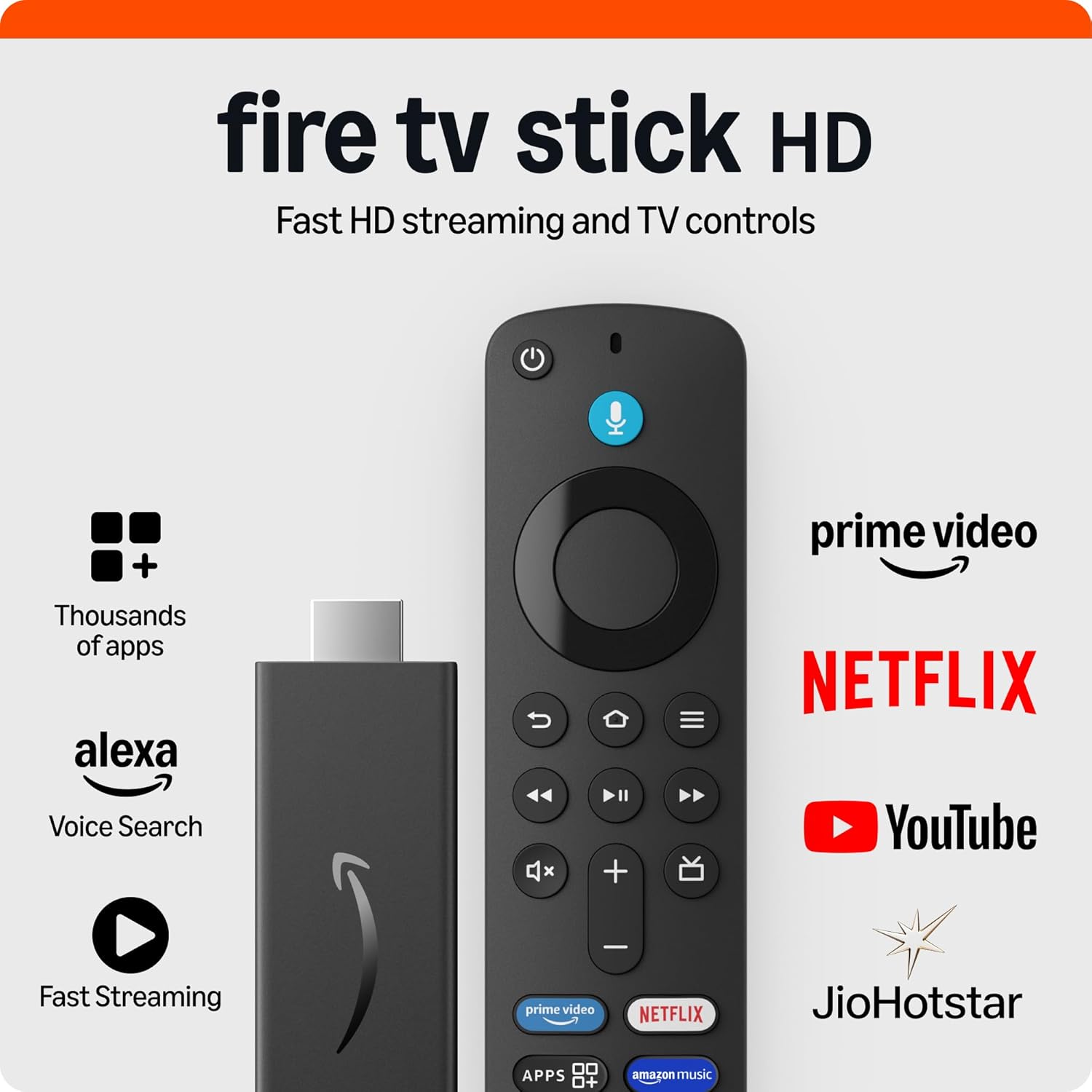
The Amazon Fire TV Stick is a compact streaming device that converts any HDMI-equipped TV into a smart TV. It supports major streaming services, offers a user-friendly interface, and includes a voice-enabled remote for quick content search.
What it does well
It provides easy access to Prime Video, Netflix, YouTube, Disney+ Hotstar, and many regional apps. The remote’s voice search simplifies finding shows and movies. The device is portable and useful for travel, temporary setups, or upgrading older TVs that lack smart features.
Hands-on testing checklist
- HD streaming test: Run a 10–15 minute HD stream to check buffering and sustained bitrate on your internet connection.
- App availability: Install Netflix, YouTube, and a regional streaming app to confirm availability and login behavior.
- Remote responsiveness: Test voice search and navigation latency while apps are running.
- Network stability: If buffering occurs, test the same stream on another device to isolate router or ISP issues.
Real-world trade-offs
Performance depends heavily on internet speed; for consistent HD streaming, aim for 10–15 Mbps per stream. The Fire TV interface may display promoted content and app suggestions; while normal, this can be distracting for some users. For 4K streaming, consider the Fire TV Stick 4K variant.
Pros: Quick setup; friendly UI; voice remote; portable.
Cons: Needs stable internet for HD streaming; occasional UI promotions.
Mi Power Bank 3i (10000mAh) — In-depth review

Overview
The Mi Power Bank 3i is a slim, reliable 10000mAh power bank with dual outputs and fast charging support. It is designed for daily carry and travel, offering a practical balance between capacity and portability.
What it does well
It supports fast charging for compatible phones and can charge two devices simultaneously. The build quality is solid for daily use, and the compact form factor fits easily into backpacks and larger pockets.
Hands-on testing checklist
- Capacity check: Fully charge the power bank, then measure how many full charges it provides to your phone model.
- Output test: Use both ports simultaneously to confirm sustained current delivery and monitor heat.
- Safety check: Ensure the bank stays cool under load and that charging stops when the phone is full.
Real-world trade-offs
The outer shell can scratch if stored loosely; use a pouch to protect the finish. Cable and adapter bundles vary by seller, so verify what is included. This power bank is not intended for laptop charging; for that, consider higher-capacity PD-capable banks.
Pros: Fast charging; two-device output; trusted brand and compatibility.
Cons: Shell may scratch; cable bundles vary by seller.
Noise ColorFit Pulse 3 — In-depth review

Overview
The Noise ColorFit Pulse 3 is a budget smartwatch featuring a large 1.96" display, Bluetooth calling, heart-rate monitoring, SpO₂ tracking, and multiple sports modes. It is aimed at users who want notifications and basic health metrics without a premium price tag.
What it does well
The large display improves readability for notifications and quick interactions. Bluetooth calling is a useful convenience for hands-free conversations. Health sensors provide trend data for heart rate and SpO₂, and sleep tracking helps monitor rest patterns.
Hands-on testing checklist
- Display test: Check readability in bright daylight and at night with the backlight on.
- Sensor accuracy: Compare heart-rate and SpO₂ readings with a trusted device to understand variance.
- Bluetooth calling: Test call quality in a quiet room to confirm microphone and speaker clarity.
- Battery test: Use typical daily routines (notifications, occasional workouts) to estimate real-world battery life.
Real-world trade-offs
Battery life is moderate — expect 5–7 days depending on usage. There is no built-in GPS, so route tracking requires a paired phone. Sensor readings are useful for trends but are not medical-grade; consult professionals for clinical accuracy.
Pros: Large readable screen; Bluetooth calling; multiple sports modes and widgets.
Cons: Battery 5–7 days; no built-in GPS; sensor variance vs medical devices.
Consolidated Hands-on Testing Checklists
Use this consolidated checklist when testing any of the gadgets on arrival. Keep packaging until you confirm everything works and test within the seller's return window.
- Unboxing: Inspect for physical damage, confirm model number and included accessories.
- Initial charge: Fully charge the device (or case) before first use if recommended by the manufacturer.
- Pairing & connectivity: Pair with your phone or Wi‑Fi and test basic connectivity features.
- Core function test: Earbuds — audio and mic; Power bank — output and capacity; Fire TV — app installs and streaming; Echo Dot — voice recognition and routines; Smartwatch — notifications and sensor readings.
- Stress test: Use the device for an extended period (1–2 hours) to check heat, stability, and battery drain.
- Return readiness: If anything is wrong, initiate a return within the seller's window and keep all packaging and receipts.
Buying Guidance — How to Choose Confidently
Choosing the right gadget under ₹5000 requires clarity about your primary use case, an understanding of trade-offs, and attention to warranty and seller reliability. Follow these practical steps before you buy.
- Define your priority: Identify the single most important problem you want the gadget to solve (audio, streaming, power, smart control, or fitness).
- Compare features: Match features to your priority — battery life, codec support, app availability, charging speed, or sensor accuracy.
- Check warranty and service: Prefer brands with accessible service centers in your city and clear warranty terms.
- Read recent reviews: Look for recent buyer feedback to spot recurring issues or quality concerns.
- Verify seller and return policy: Buy from reputable sellers with a clear return window so you can test the product on arrival.
- Test on arrival: Run the hands-on checklist within the return window and keep packaging until satisfied.
Maintenance, Troubleshooting & Safety
Proper maintenance extends product life and reduces the chance of issues. Below are category-specific tips and common fixes.
Earbuds (boAt Airdopes 141)
- Keep charging pins clean; use a soft brush to remove debris.
- If earbuds won’t pair, reset both earbuds and the case, then re-pair from your phone’s Bluetooth menu.
- Store in a soft pouch to avoid case scuffs and dust ingress.
Smart Speaker (Echo Dot)
- Place on a stable surface away from direct sunlight and heat sources.
- Use the mute button when privacy is needed; review voice history in the Alexa app if desired.
- Keep firmware updated via the Alexa app to receive feature and security updates.
Streaming Stick (Fire TV Stick)
- Restart the stick and router if buffering occurs; test with another device to isolate network issues.
- Use a short HDMI extender if the stick blocks adjacent ports or if Wi‑Fi reception is weak near the TV.
- Keep the stick ventilated; avoid enclosing it in tight spaces that trap heat.
Power Bank (Mi Power Bank 3i)
- Use quality cables and chargers; avoid cheap cables that can cause slow charging or heat.
- Recharge the power bank every 3–4 months if unused to preserve battery health.
- Do not expose to extreme temperatures or direct sunlight; store in a cool, dry place.
Smartwatch (Noise ColorFit Pulse 3)
- Keep the watch and sensors clean; wipe with a soft cloth after workouts.
- Update the companion app and firmware to fix bugs and improve stability.
- Turn off continuous monitoring features to extend battery life when needed.
Alternatives & Upgrade Paths
If you can stretch your budget or need different priorities, consider these upgrade options:
- Echo Dot upgrade: Echo (4th Gen) or Echo Studio for fuller, room-filling audio.
- Earbuds upgrade: Models with ANC and multipoint pairing for noise cancellation and seamless switching between devices.
- Streaming upgrade: Fire TV Stick 4K or Chromecast with Google TV for higher resolution and different ecosystems.
- Power bank upgrade: 20000mAh banks or PD-capable banks for laptop charging and longer trips.
- Smartwatch upgrade: Devices with built-in GPS and longer battery life for accurate route tracking and extended use.
FAQ
- Are these gadgets really under ₹5000?
- They were priced under ₹5000 at the time of writing. Prices change frequently; always confirm the current price on the seller page before buying.
- Which pick is best for students on a tight budget?
- A combination of budget earbuds (boAt Airdopes 141) and a compact power bank (Mi Power Bank 3i) covers audio and power needs affordably.
- Do these products come with warranty?
- Most mainstream brands include a manufacturer warranty. Check the product page for exact warranty terms and local service center availability before purchase.
- Can I use the Fire TV Stick on any TV?
- Yes — any TV with an HDMI port can use the Fire TV Stick; you’ll need a stable internet connection for HD streaming. Some older TVs may not support HD or 4K resolutions.
- How should I test a gadget when it arrives?
- Test pairing and audio for earbuds, charging and output for power banks, voice and routines for Echo Dot, streaming and app installs for Fire TV Stick, and sensor accuracy and notifications for smartwatches. Keep packaging until you confirm everything works.
- Are smartwatch health metrics accurate?
- Budget smartwatches provide useful trends but are not medical devices. Use them for general tracking and trends; consult medical-grade devices or professionals for clinical accuracy.
- What if a product arrives damaged or defective?
- Initiate a return or replacement through the seller immediately. Keep photos of the damage, the original packaging, and the receipt. If the seller is unresponsive, contact the marketplace support for escalation.
Conclusion
These five gadgets deliver practical value under ₹5000 without feeling cheap. Select the device that addresses your most frequent daily need: Echo Dot for smarter living and voice control, boAt Airdopes 141 for affordable audio, Fire TV Stick for streaming on any TV, Mi Power Bank 3i for dependable backup power, and Noise ColorFit Pulse 3 for notifications and basic health tracking. Use the hands-on checklists and maintenance tips in this guide to test and maintain your purchase for long-term satisfaction.
Join the conversation